Fundraising Made Easy: How to Launch Your Own Fundraising Campaign with Tiltify

Want to raise money for a great cause? Follow these simple steps to start your own charity fundraiser on Tiltify!
Planning Your Campaign
Before you jump into the technical side of setting up your fundraiser, it’s time to get organized. A little planning goes a long way.
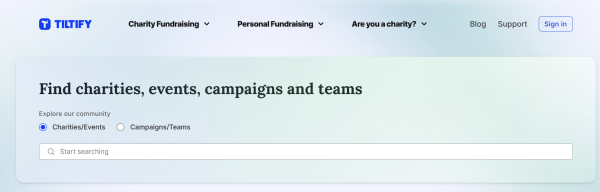
Tiltify makes it easy to search for causes, charities, events, campaigns, and teams
1. Research and Choose a Charity 💙
First things first: what cause are you passionate about? Tiltify partners with thousands of verified charities, from global organizations to local initiatives. Take some time to research and select a cause that resonates with you. Whether it’s mental health support, animal rescue, or disaster relief, fundraising is more meaningful when you’re truly connected to the mission.
2. Choose the Date and Time
Next, set your campaign timeline. Are you planning a one-day event or a multi-week effort? Consider any major holidays, charity-led fundraising events, or community happenings that could impact participation. If you’re a content creator, check your schedule to ensure you’re available and energized for your fundraiser.
3. Think of Milestones and Incentives
Make it fun! Fundraising is more engaging when there’s something for supporters to rally behind. Set milestones, mini-goals along the way, and add incentives like rewards, targets, or auctions. For example, you could promise a silly costume change, a pie to the face, or a karaoke session once you hit a certain amount. The more creative, the better. You can see our community-led fundraising incentive board to get inspired here.
4. Set a Fundraising Goal
How much do you want to raise? It’s okay to start small; even $100 can make a big difference. Many fundraisers increase their goal mid-campaign once momentum builds. Every dollar counts, and the impact of your efforts will be felt, no matter the number.
Setting Up Your Tiltify Campaign
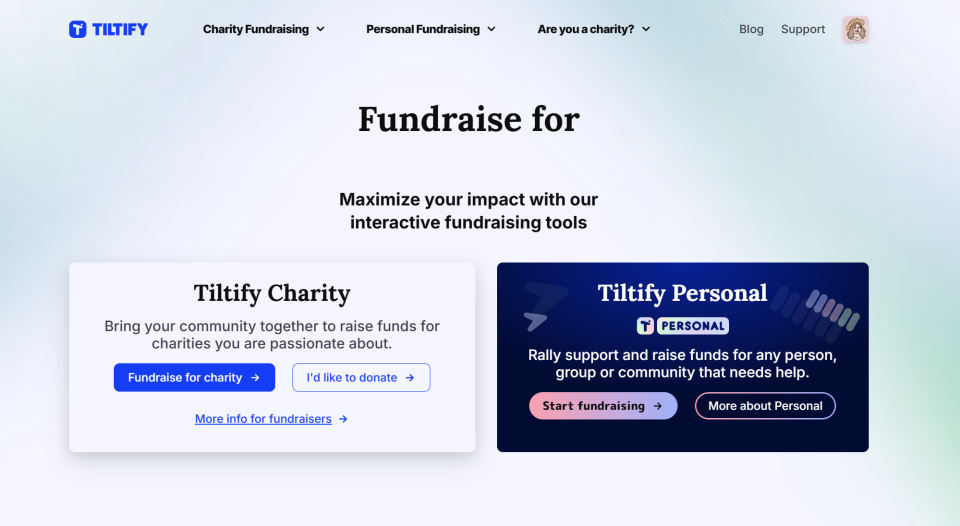
Once you’ve got your plan, it’s time to bring it to life on Tiltify. The platform makes it easy, and you’ll be up and running in no time.
1. Create Your Account and Log In
Head to Tiltify.com and create your account. If you already have one, simply log in.
2. Follow the smart-flow prompts to create your campaign
Tiltify’s smarter campaign setup guides you through the process based on how you want to fundraise. Think of it like a choose-your-own-adventure for doing good. Start Flow asks you a few quick questions:
1 .What kind of content you make?
2. How do you share your content?
2. Who your community is
And then gives you tools and suggestions that actually match your style!
Taking Your Campaign to the Next Level
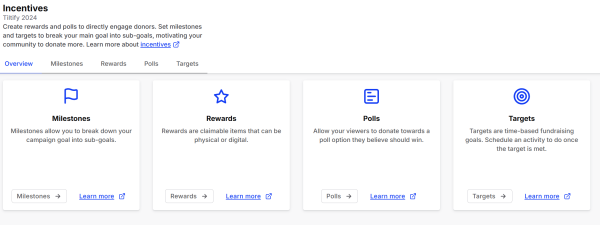
Tiltify's features are powerful tools that encourage donations
Your campaign is officially set up! But if you want to add some extra flair and engagement, Tiltify has plenty of customization options.
1. Set a Donation Thank You Message
Create a personalized thank-you message that donors will receive after contributing. It’s a small touch that makes a big impact.
2. Set Up Your Schedule
Planning a fundraising stream or a live event? Add your schedule to the campaign page so supporters know when to tune in.
3. Add Your Branding
Make your campaign uniquely yours by customizing your campaign page by changing the layout, font, colors, and more.
4. Add Your Social Media Links
Include your social media profiles so donors can follow your journey and get updates on your progress.
5. Add Incentives
Use Tiltify’s features to add donation milestones, rewards, polls, targets, or even auctions. Incentives keep your supporters engaged and excited.
6. If You’re a Streamer, Create Your Overlay
Tiltify offers an easy-to-use overlay builder. Customize it with fundraising trackers, goal progress bars, and donor alerts.
Tips for Streaming Fundraisers

If you’re a streamer, Tiltify seamlessly integrates with your setup. Here are a few extras to maximize your impact:
-
Add the Tiltify Extension to Panels: Provide a clickable link on your channel page.
-
Set Up Chat Commands: Use bots like Streamlabs or StreamElements to create a !donate command.
-
Add the Tiltify Overlay: Display real-time updates directly on your stream.
-
Pin the Donation Link in Chat: Keep your link visible for easy access.
-
Mention the Charity in Your Stream Description: Let viewers know what you’re fundraising for and why.
Bonus Tips for a Successful Fundraiser

-
Streamers: Customize Your Stream: Use Tiltify’s widgets to create dynamic overlays and alerts. For extra flair, third-party apps like Streamlabs or Streamer.bot offer even more customization.
-
Promote Your Campaign: Spread the word on social media, share updates, and encourage friends and family to contribute.
-
Join the Community: Connect with fellow fundraisers on the Tiltify Discord to swap tips and share experiences.
-
Need Help? Our support team is always ready to assist at [email protected].
You’ve Got This!
Starting a charity fundraiser might seem overwhelming at first, but with Tiltify, you’re never alone. Whether you’re streaming for hours or simply sharing your campaign link, every effort makes a difference. So choose your cause, set your goal, and start fundraising - the world is a better place with people like you in it.
Let’s make an impact together.
Updated 08/2025
If you would like to fundraise for one of 6,000+ charities, sign up here.
Learn about fundraising for personal or community needs here.
Are you a charity and want to get an account on Tiltify? Sign up here.
Find Tiltify on any of these platforms:
Website | Bluesky | Discord | Facebook | Instagram | LinkedIn | Twitter | Twitch | YouTube | Support